Workflow
This map outlines the primary user journey workflow. It details the physical actions taken by the users, the underlying system responses, and the critical fail-states if a step is misconfigured.
The JERC Sentry beta currently supports iPhones only for Protectees. Android compatibility will be added in a future update.
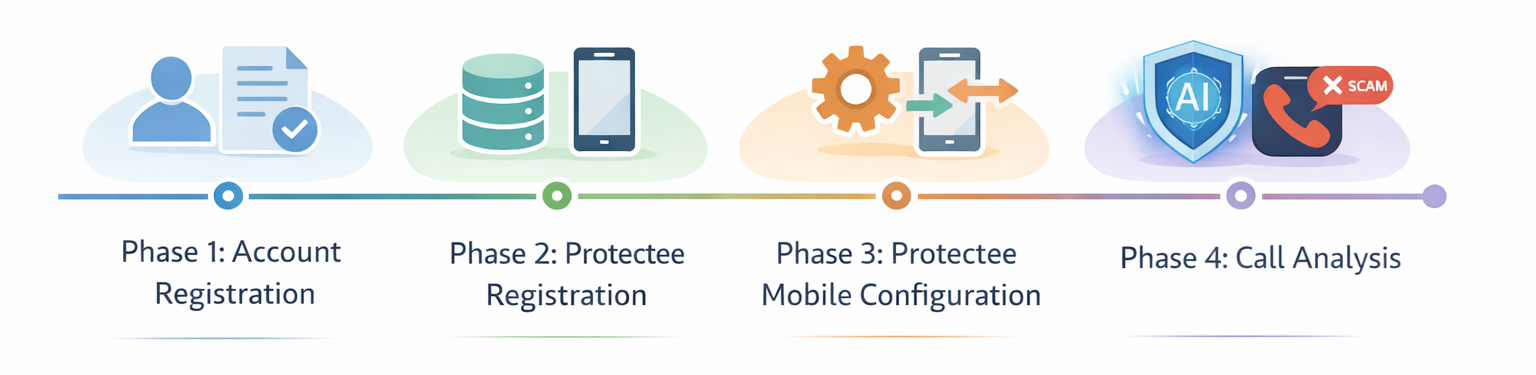
Phase 1: Account Registration
👤 User Action
The Protector enters their registration details, accepts the Terms of Service, and submits the form.
⚙️ System Response
The backend validates the payload and provisions a new account. TOS Rejected: Registration blocked. User cannot
proceed. Duplicate Account: Creation halts. User prompted to
log in.⚠️ Potential Failures
Phase 2: Protectee Registration
👤 User Action
The Protector clicks "Add Protectee", enters Protectee information and submits the form.
⚙️ System Response
The backend queries the database virtual number pool for an available virtual number and binds it to the Protectee's profile.
Resource Exhaustion: No virtual numbers available.
Creation denied; user must try again later.⚠️ Potential Failures
Phase 3: Protectee Mobile Configuration
This phase is critical, as the system relies entirely on these native iOS mechanics being configured correctly to route traffic to JERC Sentry's backend.
Step 1: Disable Live Voicemail
👤 User: Toggles "Live Voicemail" to OFF in iOS settings.
Routing Bypass: If left ON, iOS natively intercepts and transcribes the call which bypasses conditional call forwarding, meaning the JERC Sentry system will never receive any calls.
Step 2: Silence Unknown Callers
👤 User: Enables "Silence Unknown Callers" in iOS settings.
Interception Failure: If left OFF, unknown calls will ring through normally to the user. They are not instantly dropped, meaning CCF is not forced to route the call to the JERC Sentry system.
Step 3: Enable Conditional Call Forwarding (CCF)
👤 User: Dials the carrier MMI code to forward busy/unanswered calls to the assigned JERC Sentry virtual number.
Dead End: If skipped, silenced calls simply drop. The carrier does not route the traffic to the JERC Sentry system.
Step 4: Whitelist the Virtual Number
👤 User: Saves the assigned JERC Sentry virtual number as a known contact on the device.
Infinite Loop: If skipped, the virtual number attempts to bridge the call to the device. Because the device doesn't recognize it, it silences the call and CCFs it back to the virtual number, creating an endless network loop.
Phase 4: Call Analysis
👤 User Action
The Protector taps TERMINATE CALL NOW or REMOTELY JOIN CALL in the JERC Sentry mobile app after receiving an active scam alert.
⚙️ System Response
The backend sends an API request to Telnyx to either terminate the active connection (dropping the scammer) or bridge a new channel to conference the Protector in.
Network Connection: The mobile app loses connection. The intervention fails to execute, and the Protectee remains on the call.⚠️ Potential Failures